Showing posts with label Apple. Show all posts

Apple Tested 3D iPad 3 Prototypes, Says A New Report

Although we know precious little of what’s in store for Apple’s next tablet offering, that hasn’t stopped various rumors and speculation circulating around the Web.
Some – in fact, many – were left disappointed by the iPad 2′s rather negligible set of updates. Sure, it had a dual-core processor,  but both added cameras were pretty poor; just as well, since the Retina Display we’d become accustomed to with the iPhone 4 was mysteriously absent.
For a while, it seemed as though Apple would be making up for it with the third addition to its tablet roster. Rumors had been prevalent for a large portion of 2011, dating back as far asMay, with one Hollywood insider at the time stating the likelihood of a 3D iPad 3 as a "dead-cert".
A mere month later, a prototype iPad was spotted in Taiwan sporting a 3D display, seemingly adding credibility to the rumors.
BusinessInsider, citing a reliable source, notes that Apple has indeed toyed with 3D screens."The iPad 3 was often called iPad 3D in early prototypes," so said the source. Apparently though, Apple decided not to go ahead with a 3D screen since, again quoting the source, "they didn’t want it to be a gimmick."
The tipster also gave a little more insight to the type of 3D screen Apple toyed with, noting that it would have been similar to the Nintendo 3DS in that users would not have been required to sport those notably un-cool 3D glasses.
Despite the prospect of an iPad 3D seeming dead in the water, that isn’t to say the fruit company has ditched the idea altogether – despite fearing the gimmicky label.
In fact, the tipster hinted that 3D will likely make a return at some point – but only when it is"useful". Disney is supposedly 3D-fying its expansive catalogue ready for that day – if and when it does arrive.
Apple isn’t renowned for being an early adopter of new technologies (see 4G / LTE), preferring to let rivals discover and iron out the limitations. We shouldn’t  read to much into the fact that the Cupertino recently filed a patent for a 3D screen just a couple of months ago, either, since it has done this on many occasions for products which have never reached fruition.
3D iPad in future – gimmick, or game-changer? Discuss!


Take A Free iOS Developer Courses From Stanford University Through iTunes U

Many of users wish to be app developers and create their own apps for iPhone,iPod and iPad, but you will need to learn how to code using Xcode and other code programs, today Steve Demeter, the creator of Trism, reportedly earned a cool quarter million in just two months from his app sales.

Steve says that when he first released his first app and pushed it to the App Store, he was shocked from number of downloads and the number he earned from only one app, yeah that's cool, but what if you want to learn how to build your own app ?! Well I am sure that you will go to lessons in the college or something and pay, or of course spend the whole night searching and leaning from yourself how to develop apps, but now you will get the chance to take a free iOS developer courses from Stanford university through iTunes U.

iTunes U, the educational section of iTunes Videos, is a great resource for folks looking to get into programming. In fact, Stanford University has its entire iOS App Development course on video and available for download in the iTunes U library. And it’s completely free.

But if you’ve been wanting to further your app developing skills, or just brush up, why not learn from the teachers at a top-notch university like Stanford. For folks who are interested, you can head on over to the school’s iTunes U page and start downloading.

[Source]

Apple Reduces iPad 2 Supplies, Makes Room For iPad 3 [REPORT]

There is no doubt that due to the highly successful nature of their products, Apple will continue to release next generations of their iDevices for years to come. The question is not if we’ll be seeing an iPad 3 and iPhone 5 in the future, but the when. Now thanks to some new info, we can shed a little light into the latter, at least as far as the iPad 3 goes.

Digitimes reports Apple has began to adjust their inventory, reducing the amount of panels requested from suppliers. Current panels measure 9.7 inches and are shipped from several suppliers including Samsung Electronics, LG Display and Chimei Innolux. According to their sources:
iPad 2
“Due to inventory adjustments at Apple, LG Display saw its shipments of 9.7-inch panels to Apple decline from three million units in September to 2.5 million units in October. Samsung managed to keep its shipments of 9.7-inch panels flat at two million units in October, while CMI slashed its shipments from 700,000 units to 350,000 units during the same month.”
Although the iPad 2 is one of the most wished-for gadgets this holiday season, Apple reportedly has enough stock to handle the demand. According to Apple, 11.12 million iPads were sold in the third quarter of this year. With current production rates, this would leave a surplus of 4 to 5 million units of the iPad 2 in supply. If a new device is planned for distribution anytime soon, a reduction in panel shipments makes perfect sense. This would ensure all remaining stock could be sold at the premium price. The iPad 2 would still be offered for sale after an iPad 3 announcement.
How does the iPad 3 come into the picture? Well, while these companies have had current panel shipments reduced, Samsung and Sharp have already started the process of building newer panels for the next generation device. According to the same sources, TPK Holding and Wintek will join the team in the production as well. This has been taken place sine October, indicating a release date for the new device early next year.
Apple has always been very secretive about their launch and production schedule, leaving us with only rumors and speculation. As we dissect and investigate each one, which has turned into a new Internet hobby of sorts, we have to remember that no date is certain until an official announcement is made.

Apple Is Working On iOS 5.1 With New Siri Capabilities !

A couple of days ago Apple released iOS 5.0.1 which fixes iPhone battery issues but with the time we realized that it doesn't fixed all users batteries, today we have got some good news from Macerkopf which claims that Apple is working on iOS 5.1 which will bring some new features to Siri and iOS 5.0.2 which will fix the rest of iPhone batteries...
The report says that Apple is working on iOS 5.0.2 and it should be released at the end of the next week and fix all iPhone battery issues, and really Apple should work hard in these days because users are complaining specially those who are using iPhone 4S while The new 5.1 update is also expected to bring Maps integration with Siri to additional countries. We'll bring you more information on these updates as it becomes available.

VolumeSnap Returns To Camera+ For iPhone – Take Shots On Your Device Like A Pro!

Of all the third party alternatives to the indigenous iOS apps, the camera is probably the most replicated, with dozens of different iterations offering various options unavailable in the stock Camera.app.


With the iPhone’s camera competing against the large-lensed Nikons and Canons on Flickr for example, it’s hardly of great surprise that developers are keen to make a quick buck as consumers utilize their smartphone as the AIO portable gadget.
With the flagship iPhone 4S now sporting a much-improved 8-megapixel snapper, the trend of using iPhones in place of the bulkier standalone cameras looks set to continue.
The popular Camera+ app, which has just been updated, has a whole host of great features and is a worthy alternative to the standard camera application. Re-entering to the fold is itsVolumeSnap feature, which gives users the option of selecting the volume button to take photos – utilizing that ergonomically-correct index-finger action. In addition to feeling more like a camera, it enables the device to be held more steadily, preventing blur and paving the way for crisp, sharp photos of those treasured moments.
The app, developed by TapTapTap, used to have the VolumeSnap on its feature-list some time ago, but was abruptly removed from the App Store for breaking Apple’s strict developer guidelines. With iOS 5 bringing VolumeSnap to the native app though, it seems as though the Cupertino company has backtracked on its principles, allowing apps to use the volume buttons as well as the touchscreen interface.
Besides VolumeSnap, there are tons of useful features which make it a good investment if you’re looking for a few more features than the bare minimum provided by Apple.
It was amongst the sea  of very early apps to hit the App Store back in 2007, and has gone from strength to strength ever since – averaging annual sales of a million.
It’s currently on sale – $0.99 as opposed to the usual $1.99, and as a frequent user of this particular app, I advise you to get it while it’s hot! (And cheap!)
Camera
Download it here, or search for it in the App Store app on your device.

Researches Show's That 62% Of iPads Never Leave Home !

Apple amazed world of technology when it first released iPad the best Smartphone tablet design that you will ever see, with it's cool design less thickness, but what if I told you that according to some researches from GigaOM show's that 62% of iPads never leave home !
Firstly McKinsey came up with this data during a recent survey of 15,000 consumers in 15 countries, undertaken to create a profile of what the firm calls the “iConsumer.” Bertil Chappuis, principal for McKinsey & Company’s Silicon Valley office, presented his findings on Tuesday morning at Forbes’ Techonomy conference in Tuscon, Ariz.

Here’s GigaOM on the results:
“Of the iPad owners McKinsey surveyed, it found that 62 percent never take their iPad outside their house. In other words, it’s being used as just another home computer, like a replacement laptop for tasks such as watching video or browsing the web. While the iPad is “finding its way into places in the home we didn’t have computing in the past,” the living room is where people use their iPad: 70 percent of usage takes place there.”
Well really I didn't thought that iPad will stay in home, I think people use their iPads in the toilet or something like this...

[Source]

iOS 5.0.2 Coming Next Week Brining Fix To The Battery Issue–iOS 5.1 Under Development, Will Bring Siri Improvments

Apple will be releasing iOS 5.0.2 as soon as next week to fix the battery life time issue, According to the popular German blog Macerkopf.de. The battery issues which originally appeared in iOS 5 which Apple tried to fix it in iOS 5.0.1 but it even got worse, not just that iOS 5.0.1 brought more issues. According to JailbreakApp

iOS 5.0.2 To Solve Battery Life Issues

Apple has confirmed that the battery issues still exists in iOS 5.0.1 and stated that they are investigating the problems. Now reports claims that Apple will be releasing iOS 5.0.2 to fix the battery life issues as soon as next week.

Apple Working On iOS 5.1 Bringing Siri Improvements

Also the report said that Apple is working on iOS 5.1 which will be bringing improvements and new features to Siri. The report also mentioned that iOS 5.1 will bring Map integration with Siri to new countries. However, there is no ETA on the release time of iOS 5.1Apple has confirmed that the battery issues still exists in iOS 5.0.1 and stated that they are investigating the problems. Now reports claims that Apple will be releasing iOS 5.0.2 to fix the battery life issues as soon as next week.

Apple Working On iOS 5.1 Bringing Siri Improvements

Also the report said that Apple is working on iOS 5.1 which will be bringing improvements and new features to Siri. The report also mentioned that iOS 5.1 will bring Map integration with Siri to new countries. However, there is no ETA on the release time of iOS 5.1

Complains About iPhone 4S Loosing Signal For No Reason

An issue in the iPhone 4S has been discovered and it’s not the poor battery life time issue. Which Apple is currently working on iOS 5.0.2 to solve it. The new issue is completely loosing signal without any reason. According to Cultofmac

iPhone 4S Signal Loss Issue

The problem with the iPhone 4S has no known reason yet. It’s not an antenna issue as the device doesn’t loos signal when you hold it in a certain position. The problem just happens suddenly, One second you have a full 5 bar signal and the next you have the “No Service” message.
One iPhone 4S user has reported the issue on Apple’s Discussion forums saying:
I’ve been using an iPhone 4 on a Vodafone contract for the past 16 months and just bought an iPhone 4S direct from Apple. It arrived on Friday morning and I got it set up correctly as far as I can tell. When I first turn it on, it works lovely and exactly as I would expect, able to make calls, send texts and access the internet via the cellular network. However, at what appears to be random, the network will disappear (no bars of signal) stopping me making calls and texts, but still allowing me to access the internet. Sometimes, the internet goes, but I can still make calls and texts. Other times, everything is gone and I get “No Signal” where it normally says Vodafone UK. So when trying to fix this problem after it’s noticed, I try putting it into Airplane mode and back out. The phone scans for a network and goes back to the same state as before I tried this fix. I have tried resetting network settings, but this doesn’t change anything. The only thing that actually fixes it temporarily is turning the phone right off and back on again.

How to fix the iPhone 4S Signal Loss Problem:

According to Razorian Fly, The problem can be fixed by turning the ‘SIM PIN’ feature off. As they suggest the problem is a software related.
Go to Settings > Phone Menu > Turn the SIM PIN off.
It’s not a hardware issue, it’s software. For some reason, iOS is cycling the radio on and off, I’m guessing something mixed up with SIM pin permissions. What I had to do was turn on SIM pin, then off, at which point it demanded the PUK code. I was able to get it online through my ATT account. After I entered that PUK, then went back into settings and turned SIM pin off, I haven’t had any problems.

The iPhone 4S problem is caused by iOS 5.0.1

One user claims that the issue happened only after he updated to iOS 5.0.1
I think I have cracked it. I have read every post and comments and tried and every possible fix. Does not work. I’m using iPhone 4S 16gig bought from Melbourne, use in Cambodia carrier Mobitel. Issue, no signal. 3G come and go. I have to on and off to get back signal sometime aeroplane mode on and off. My iPhone is useless. It was fine on 5.0 problem only exist after I update to 5.0.1.
Maybe Apple will fix the problem in iOS 5.0.2 which is said to be coming as soon as next week.

The Amazon Kindle Fire Is Here, Is It Really An iPad 2 Competitor?

Amazon has recently released its New Kindle fire tablet, The first colored Amazon Kindle, And it’s only for $199. So what do you think the Kindle Fire would do against the iPad 2? Check it out after the jump.
Amazon Kindle Fire

The Amazon Kindle Fire

We have been waiting for this device for months now. And to be fair, it’s worth the waiting. The Kindle Fire with it’s amazing interface and the low price is the most device that gives the iPad 2 a real competition.

The Kindle Fire Vs. The iPad 2

At $199, No one expects the Kindle fire to stand up to the iPad 2, But the Kindle fire really does keep up with the iPad 2.  The Video Below put together by Jeff Benjamin over at iDownloadBlog, Demonstrate how the iPad 2 is much faster in the boot up time. In terms of web browsing the Kindle fire is really keeping up with the iPad 2, And unlike the iPad 2, The Kindle fire loads flash and it’s expected to be much faster with it disabled. The Kindle fire is much faster in Netflix video streaming, But the kindle fire is running the latest version of he app with the new interface which is expected to come to the iPad in the next weeks. We’ll see how the iPad 2 will do when the new Netflix for iPad gets released.

The Kindle Fire Vs. The iPad 2 [Video]

The Amazon Kindle Fire is an amazing tablet for $199, It’s awesome for web browsing, email, streaming videos, But it’s not an iPad 2 when it comes to gaming and running power hungry apps.

TinyUmbrella Download Available To Support iOS 5.0.1

The well known developer @Notcom the guy behind TinyUmbrella has just announced on his Twitter account that it's tool has just updated to version 5.01.00 which supports iOS 5.0.1 so that you will be able to restore to a previous version by using TinyUmbrella..


You can also read TinyUmbrella release note:
Even though there is still no working solution for restoring 5.x on iPhone 4S I have released a 5.01.00 so you can at least save 5.0.1 SHSH. I have added tentative support for at least saving 5.0.1 SHSHs for iPhone 4S but as of now we are unable to use them fully. As soon as more information is available I will update.
Now it's time to download....

Download TinyUmbrella v.5.01.00 [Windows users]
Download TinyUmbrella v.5.01.00 [Mac users]


Source

របៀបបង្កើត Apple Store ID Free Free

របៀបបង្កើត Apple Store ID Free Free សរុបមាន ៩ ជំហ៊ាន


1 - រើសយក Create New Apple ID

(http://img843.imageshack.us/img843/8506/picture001d.png)


2 - រើសយក Singapore

(http://img36.imageshack.us/img36/1312/picture002p.png)


3 - ចុច Agree

(http://img46.imageshack.us/img46/533/picture003z.png)


4 - ចុច Agree

(http://img254.imageshack.us/img254/3899/picture004n.png)


5 - ដាក់ Email និង Password (Password ត្រូវតែប្រើអក្សរធំ1 លាយជាមួយអក្សរតូចៗ និង លេខផង សរុបតិចបំផុត ៨ខ្ទង់)

(http://img204.imageshack.us/img204/2669/picture005j.png)


6 - បំពេញសំនួរ ចម្លើយ និង ថ្ងៃខែឆ្នាំ កំណើតអ្នក

(http://img854.imageshack.us/img854/734/picture006c.png)


7 - Payment Card រើសយក None

(http://img196.imageshack.us/img196/1511/picture007t.png)


8 - បំពេញ ភេទ, ឈ្មោះ, អាសយដ្ឋាន, Postal Code, Phone រួចចុច Next

(http://img405.imageshack.us/img405/9196/picture009h.png)


9 - ចប់សព្វគ្រប់ហើយ សូមចូលទៅកាន់ Email របស់អ្នក ដើម្បីបញ្ជាក់ការបង្កើត Account

(http://img510.imageshack.us/img510/8932/picture010h.png)

New Waterproof Watch Kit For iPod Nano [VIDEO]

The iPod has revolutionized the portable MP3 market bringing beautiful compact designs year after year. The recent iPod nano you have come to know and love has had a lot of success in even becoming a fashion accessory. Many kits are being sold online which allow you to transform your iPod nano into a watch, although many, if not all, are not waterproof.


From the creators of Boombots, a new product is being developed and seeking support into becoming a reality. The Proof is a new waterproof watch kit for your iPod nano. The watch kit’s design allows it to be submerged in water without damage. You can use your watch on a day-to-day basis whether you are surfing, waterskiing, poolside or just washing dishes. Here’s how the San Francisco based startup describes their product:
The Proof is constructed for durable polyurethane coated with a thick silicone wrapping. The touch screen on the iPod nano retains full functionality with the use of an ultra thin polycarbonate lens.
The strap on the Proof is made of ultra thick, yet flexible silicone. With this engineering, we’ve managed to create an IP68 grade seal to protect the nano up to a 3m depth. With The Proof, say goodbye to water damage or impact casualties and say hello to doing everything you love with the convenience and control of your music right on your wrist.
Installation also seems to be a breeze. Once you receive the kit, slide the nano into the case and attach any of the three adapters included. Each adapter has a unique purpose. You would you use one of them on a daily basis for complete project and minimal size, the second one will allow you to access the auxiliary jack and the third will give Bluetooth access to your iPod allowing you to pair it with another device.


If you would like to know more, check out their Kickstarter page. Kickstarter has helped fund many fun projects, films and ideas. Anyone can pledge any amount, and if the fund target is not met by the deadline, no funds are collected.
The waterproof device plans to sell for $79.95. Although you can contribute almost any amount, there are benefits with each tier.
  • Pledging $49 for the product, and you are essentially pre-ordering The Proof Nano-watch including a fully sealed adapter and the headphone adapter.
  • Pledge $79 and they’ll throw in their original Boombotix BB1 Speaker as well.
  • Back them up with $99 or more and you’ll receive the complete kit (including the Bluetooth dongle), which will retail at $129.95.

Control Siri With Brain

Monthes ago when apple released iPhone 4 with alot of posts talken about the new device such as “how we used iPhone 4 to cupture a fantastic video”, “iPhone 4 in space”, “iPhone 4S helped to find my kitty”. up tell now no one talken about any stories except Siri.

Of course you may control siri with brainwaves, hackers said that. And we don't need any more to utter to issue a commend to siri.
1. ECG pads provide raw skin conductivity / electrical activity as analogue data (0-5v).
2. This is plugged into the Arduino board via 4 analogue inputs (no activity = 0v, high activity = 5v).
3. The Arduino has a program burnt to it’s EPROM chip that filters the signals.
4. Josh trained the program by thinking of the main Siri commands (“Call”, “Set”, “Diary” etc.) one at a time and the program where we captured the signature brain patterns they produce.
5. The program can detect the signature patterns that indicate a certain word is being thought of. The program will then wait for a natural ‘release’ in brain waves and assume the chain of commands is now complete and action is required.
6. The series of commands are fed to a SpeakJet speech synthesiser chip.
7. The audio output of which simply plugs into the iPhone’s microphone jack.
Controling Siri with brainwaves : 


Via | WikiJailbreak

Not Every Body Is An iPhone Fan, At Least Not This Dog [Video,Humor]

Do you love your iPhone? Well, this dog doesn’t at all. This video has been posted on you tube by stefanjtorres showing his dog, coco the pug freaking out every time the iPhone ad is being aired. Check it out after the jump. According to TNW


Pug

Here is the amazing Pug video :


This Sixth Grader Develops iOS Apps And Runs His Own Website

Most of the 12 year old kids out there are used to 12 watches TV, play PC games and more things. But not this one, Thomas Suarez has begun developing iPhone apps along side running his own website. According to iDownloadBlog


Sixth Grader - Developer

12 Year old iOS Developer

Thomas didn’t stop at this. He has organized a club in his school to teach other kids programming.
Watch Thomas at this year’s TEDxManhattanBeach conference:
o, What did you used to do when you were 12 ?

Jailbreak iOS 5.0.1 Using Redsn0w 0.9.9b8 ! [How To]

reak iOS 5.0.1 Using Redsn0w 0.9.9b8 : iOS 5.0.1,  launched to the public for all iPhone, iPad and iPod touch users. Just like previous releases – iOS 5.0.1 can be jailbroken using the latest version of the iPhone Dev Team’s tool, redsn0w.
iOS 5.0.1, can be jailbroken using redsn0w 0.9.9b8 and the SemiTether tool can be used on iOS 5.0.1 to bring semi-tethered jailbreak. For more information about the SemiTether on a previous post.

Supported devices for the below guide:

iPhone 4 (semi untethered)
iPhone 3GS new bootrom (semi untethered)
iPhone 3GS old bootrom (untethered)
iPod touch 4G (semi untethered)
iPod touch 3G (semi untethered)
iPad 1 (semi untethered)

Of course the iPad 2 and iPhone 4S jailbreaks are not yet available. If you’re looking forward to fast & future jailbreak, betternot upgrade to iOS 5.0.1.

Jailbreak iOS 5.0.1 Semi Untethered:

STEP 1: Download iTunes 10.5 and iOS 5.0.1 final version.

STEP 2: Backup your iPhone, iPad or iPod touch and restore it using the iOS 5.0.1 IPSW file downloaded from the first step.

STEP 3: Download Redsn0w 0.9.9b8 for Windows or Mac OS X from here.

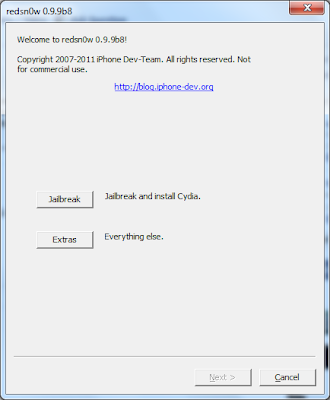
STEP 4: Open Redsn0w and select “Extras” then “Select IPSW” and browse for the iOS 5.0 IPSW file (download here).

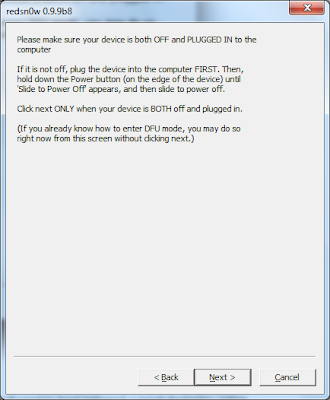
STEP 5: Now click on “Jailbreak” then “Install Cydia”. You’ll need to follow the on-screen instructions to get your device into DFU mode.

STEP 6: Once jailbroken, your device will be rebooted.

STEP 7: Now open Redsn0w again and hit “Extras” then “Just Boot”.

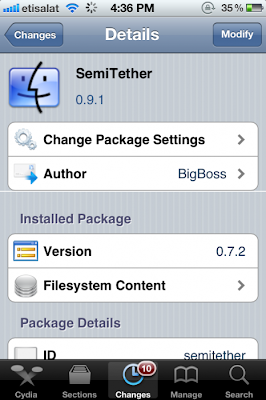
STEP 8: Now head to Cydia then search for “SemiTether” and install the tool:

SemiTether

NOTE: The last step about SemiTether is optional for users. It will allow you to reboot your device without need to a computer to connect to. You’ll lose some functions like opening mail and almost all jailbreak tweaks. You can read morehere.

[ VIA cydiahelp ]